Core Web Vitals Explained for Business Owners (Without the Developer Jargon)
If your website feels “fine” to you but your Google rankings keep slipping, Core Web Vitals are worth a look before anything else. They’re a set of three metrics Google uses to measure how a real visitor experiences your page — how fast it loads, how quickly they can actually interact with it, and whether things jump around while they’re reading. Google factors these into rankings as part of its page experience signals, so a slow or jumpy site can hold back an otherwise well-written page.
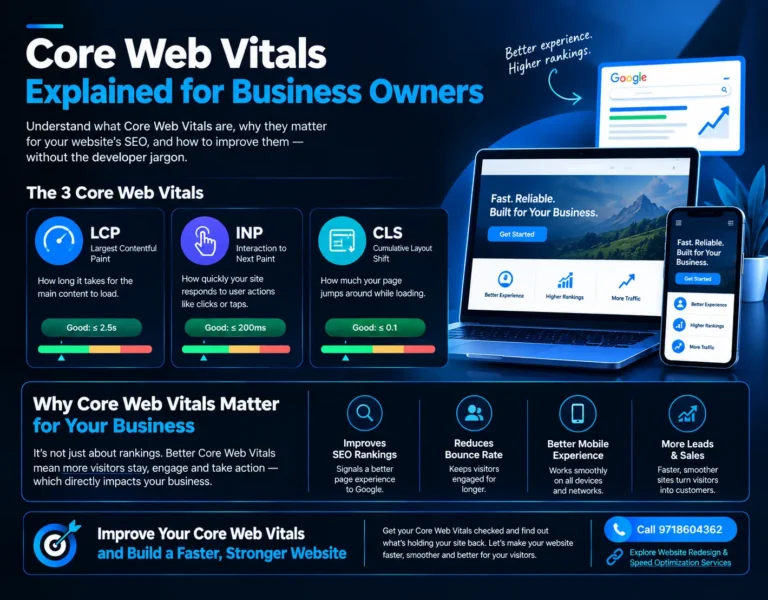
What Core Web Vitals Actually Measure
There are three metrics, and each one answers a different question about the visitor’s experience.
Largest Contentful Paint (LCP) — how long it takes for the biggest visible element on the page (usually a hero image, banner, or heading) to fully load. If someone lands on your homepage and stares at a blank screen for four seconds before anything meaningful shows up, that’s a poor LCP. Google wants this under 2.5 seconds.
Interaction to Next Paint (INP) — how responsive your site is when someone actually tries to use it: tapping a menu, clicking “Add to Cart,” filling a form. INP measures the delay between that action and the page visibly responding. A site that “looks” loaded but ignores taps for a second or two frustrates people fast, and Google now weighs this heavily since it replaced the older First Input Delay metric.
Cumulative Layout Shift (CLS) — how much your page’s content jumps around as it loads. You’ve felt this: you go to tap a link, and right before your finger lands, an ad or image loads in above it and you end up clicking the wrong thing. That’s a CLS problem, and it’s one of the most common reasons visitors bounce within seconds of arriving.
Why This Matters Beyond Rankings
It’s easy to treat this as a technical SEO checkbox, but the ranking impact is really a side effect of something more direct: sites with poor Core Web Vitals lose visitors before those visitors ever see what the business actually offers. Someone searching for your services on their phone, on a mediocre connection, standing in a parking lot — that’s a real, common scenario, and a slow LCP means they never see your offer at all. Google’s ranking algorithm is, in a sense, just measuring what already costs you business.
For local and service-based businesses specifically, this hits harder than people expect. A visitor comparing three plumbers or three clinics in the same search results isn’t going to wait around for the slowest one to load. They’ll tap back and pick whichever site responded first.
Where Business Owners Usually Get This Wrong
A few patterns show up again and again on small business sites:
- Oversized, unoptimized images — a photographer’s high-res portfolio shot used as-is for a hero banner, when a properly compressed version would look identical to the eye and load in a fraction of the time.
- Too many third-party scripts — chat widgets, tracking pixels, review plugins, and font loaders all stacked on top of each other, each adding its own delay to INP.
- Ads or embeds that load late — these are the classic CLS culprits, especially on blog pages and WordPress themes that weren’t built with reserved space for dynamic content.
- Redesigns that prioritize visuals over performance — a beautiful new homepage with parallax effects and video backgrounds can tank all three metrics if it isn’t planned with speed in mind from the start.
That last point matters especially if you’re mid-redesign or considering one. Speed isn’t something you bolt on after the design is done — it needs to be part of the plan from day one, which is exactly the kind of thing to sort out before a rebuild rather than after. If you’re weighing a redesign right now, it’s worth reading through our guide on website redesign and speed optimization so the two aren’t treated as separate projects.
How to Check Your Own Scores
You don’t need to guess. Google’s PageSpeed Insights tool gives you real, field-collected data (from actual Chrome users who’ve visited your site) alongside a lab-simulated score. Search Console’s Core Web Vitals report does something similar across your whole site, grouping URLs by whether they pass or fail. Both are free and take under a minute to run — it’s worth checking before assuming your site is fine just because it looks fine on your own fast office wifi.
What Actually Fixes These Issues
Compressing and properly sizing images is usually the single biggest LCP win, followed by removing scripts and plugins the site doesn’t actually need — every business site accumulates a few of these over time. Reserving fixed space for ads, embeds, and images before they load solves most CLS problems outright. INP tends to improve when heavy JavaScript is deferred or removed rather than loaded upfront on every page, even pages that don’t use it.
None of this is a one-time fix, either. Every new plugin, every added tracking script, every image uploaded without resizing chips away at these scores again. Sites that stay fast are the ones checked periodically, not fixed once and forgotten.
Frequently Asked Questions
1. What are Core Web Vitals, in simple terms?
Lorem ipsum dolor sit amet, consectetur adipiscing elit. Ut elit tellus, luctus nec ullamcorper mattis, pulvinar dapibus leo.
2. Do Core Web Vitals actually affect Google rankings?
Lorem ipsum dolor sit amet, consectetur adipiscing elit. Ut elit tellus, luctus nec ullamcorper mattis, pulvinar dapibus leo.
3. What's a good LCP score?
Lorem ipsum dolor sit amet, consectetur adipiscing elit. Ut elit tellus, luctus nec ullamcorper mattis, pulvinar dapibus leo.
4. What replaced First Input Delay (FID)?
Lorem ipsum dolor sit amet, consectetur adipiscing elit. Ut elit tellus, luctus nec ullamcorper mattis, pulvinar dapibus leo.
5. Can a beautiful website still fail Core Web Vitals?
Lorem ipsum dolor sit amet, consectetur adipiscing elit. Ut elit tellus, luctus nec ullamcorper mattis, pulvinar dapibus leo.
6. How do I check my website's Core Web Vitals score?
Lorem ipsum dolor sit amet, consectetur adipiscing elit. Ut elit tellus, luctus nec ullamcorper mattis, pulvinar dapibus leo.
7. Is a slow mobile score more important than desktop?
Lorem ipsum dolor sit amet, consectetur adipiscing elit. Ut elit tellus, luctus nec ullamcorper mattis, pulvinar dapibus leo.
8. Will Core Web Vitals scores improve immediately after fixes?
Lorem ipsum dolor sit amet, consectetur adipiscing elit. Ut elit tellus, luctus nec ullamcorper mattis, pulvinar dapibus leo.
9. Do I need a developer to fix Core Web Vitals issues?
Lorem ipsum dolor sit amet, consectetur adipiscing elit. Ut elit tellus, luctus nec ullamcorper mattis, pulvinar dapibus leo.
10. Should I fix Core Web Vitals before or during a website redesign?
Lorem ipsum dolor sit amet, consectetur adipiscing elit. Ut elit tellus, luctus nec ullamcorper mattis, pulvinar dapibus leo.
Want your site’s Core Web Vitals checked properly instead of guessing? Get in touch with Sanjeev Kumar Malik for a straightforward speed and performance review — see what’s actually slowing your site down and what it would take to fix it. Visit sanjeevkumarmalik.in or call 9718604362.