How Website Speed Affects SEO and Conversions
Website speed optimization is the critical process of enhancing your site’s load time, directly boosting both your search engine rankings and conversion rates. When page speed drags beyond 3 seconds, user bounce rates spike and search engines penalize your visibility, making speed a non-negotiable factor for digital performance.
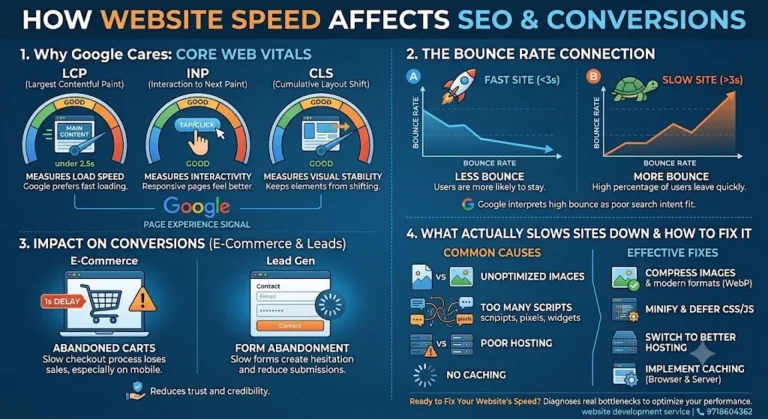
Core Web Vitals Alignment: Focuses on improving key performance metrics like Largest Contentful Paint (LCP under 2.5s), Interaction to Next Paint (INP), and Cumulative Layout Shift (CLS) to satisfy search engine algorithms.
Conversion Rate Lift: Eliminates performance bottlenecks on high-value pages, directly preventing cart abandonment in e-commerce and form abandonment in lead generation.
Technical Overhead Reduction: Involves compressing images into modern formats (WebP/AVIF), deferring non-essential scripts, enabling caching, and upgrading hosting infrastructure for faster server responses.
Why Google Cares About Page Speed
Google’s Core Web Vitals— Largest Contentful Paint (LCP), Interaction to Next Paint (INP), and Cumulative Layout Shift (CLS) — are part of the page experience signals Google uses to evaluate and rank websites. LCP measures how fast your main content loads, INP tracks how quickly your page responds to clicks and taps, and CLS checks whether elements jump around while the page is still loading.
None of these are abstract lab metrics. They come from real user data collected through Chrome, which means Google is judging your site the same way an actual visitor experiences it. A site that scores poorly here isn’t being “penalized” in some arbitrary sense — it’s being ranked accurately against sites that give users a smoother experience.
The Bounce Rate Connection
Speed and bounce rate move together in a fairly predictable way. Every extra second a page takes to load increases the chance a visitor leaves before it even finishes rendering. Mobile users are even less patient than desktop users, since they’re often on inconsistent networks and expect instant results.
High bounce rates send a secondary signal to Google too — if people are landing on your page and immediately leaving, it suggests the page isn’t satisfying the search intent, which can quietly work against your rankings even beyond the raw speed score.
How Speed Affects Conversions, Not Just Rankings
This is the part business owners feel directly. A slow-loading product page, checkout form, or contact page doesn’t just hurt SEO — it hurts the bottom line:
- E-commerce: A delay of even a second or two during checkout is enough to make a buyer abandon their cart, especially on mobile.
- Lead generation: Contact forms and quote requests lose submissions when the page feels sluggish, because hesitation creeps in the moment loading feels uncertain.
- Trust: A slow site subtly signals “this business hasn’t invested in itself,” which affects how visitors judge credibility before they’ve read a single word of copy.
Speed optimization, in other words, is conversion optimization wearing a technical hat.
What Actually Slows a Website Down
A handful of causes show up again and again during audits:
- Unoptimized images — large image files are usually the single biggest contributor to slow LCP.
- Too many render-blocking scripts — third-party trackers, chat widgets, and plugin bloat all add weight before the page can paint.
- Poor hosting — shared or underpowered hosting struggles under traffic spikes and adds latency to every request.
- No caching strategy — without browser or server-side caching, every visit re-fetches everything from scratch.
- Bloated themes or page builders — heavy CMS themes often ship far more CSS and JS than any single page actually needs.
Fixing It: What Website Speed Optimization Actually Involves
A proper speed optimization pass isn’t one fix — it’s a combination working together:
- Compressing and serving images in modern formats (WebP/AVIF) at the right dimensions
- Minifying and deferring non-critical CSS/JS
- Implementing browser and server-side caching
- Moving to hosting that matches the site’s actual traffic and complexity
- Reducing third-party script bloat to only what genuinely earns its place
- Stabilizing layout shifts by reserving space for images, ads, and embeds before they load
This is also where a full redesign sometimes makes more sense than patchwork fixes — if the underlying theme or codebase is the bottleneck, no amount of image compression will fully solve it. That’s the kind of work covered under Website Redesign & Speed Optimization, where the structure itself gets rebuilt around performance rather than bolted on after the fact.
A Realistic Way to Think About Priority
Not every business needs a from-scratch rebuild. If your site is fundamentally sound but loaded down with bloated plugins and unoptimized media, targeted fixes can bring real gains fast. If the site is old, built on an outdated stack, or was never designed with performance in mind, a redesign focused on speed from the ground up tends to be the more durable fix — you’re not fighting the architecture every time you try to shave off another second.
FAQs
1. How much does page speed actually affect Google rankings?
It’s one of several ranking factors, not the only one. A fast site with weak content still won’t outrank a well-optimized, relevant page — but between two similarly strong pages, the faster one has a real edge, especially on mobile search.
2. What's a good page load time to aim for?
Under 2.5 seconds for Largest Contentful Paint is generally considered good by Google’s Core Web Vitals thresholds. Anything consistently above 4 seconds is flagged as poor.
3. Do Core Web Vitals affect mobile and desktop rankings differently?
Google evaluates them separately for mobile and desktop, and since mobile-first indexing is standard now, your mobile speed scores carry more weight for most sites.
4. Can a fast website still convert poorly?
Yes — speed removes a barrier, but it doesn’t replace clear messaging, a strong offer, or a well-designed conversion path. Speed and conversion design work together, not as substitutes for each other.
5. Is image optimization enough to fix a slow site?
Sometimes it makes a noticeable dent, but if the real problem is bloated code, poor hosting, or an outdated theme, image compression alone won’t get you to a genuinely fast site.
6. How do I know what's actually slowing my site down?
A proper technical audit — checking hosting response times, script load order, image weight, and caching setup — identifies the actual bottlenecks rather than guessing.
7. Does switching hosting really make a measurable difference?
Often yes, especially when moving off shared hosting to something built for the site’s actual traffic and stack. Server response time is one of the first things that shows up in LCP.
8. Will speed optimization break my existing design?
Done properly, no — optimization should preserve how the site looks and functions while improving how it performs behind the scenes.
9. How often should website speed be reviewed?
At minimum after any major content or plugin addition, and as a general check every few months, since sites tend to accumulate weight over time even without major changes.
10. Is a full redesign always necessary for speed issues?
Not always. If the foundation is solid, targeted fixes work well. A redesign becomes worth it when the underlying structure itself is the limiting factor.
Ready to Fix Your Website's Speed?
If your site is losing visitors and rankings to slow load times, it’s worth getting an honest read on what’s actually causing it before spending on random fixes. Sanjeev Kumar Malik works directly with businesses on website redesign and speed optimization — from diagnosing the real bottleneck to rebuilding the site around performance.
Check out the Website Development Services page, or call 9718604362 to talk through what your site actually needs.