Dark Mode Website Design: Is It Actually Worth Building for Your Audience?
Dark Mode Website Design: Is It Actually Worth Building for Your Audience? Dark mode is worth building when your visitors...
Read More → A customer messages your store on WhatsApp at 9 PM asking, “Is the blue one available in medium?” If your team replies the next morning, that sale has probably gone to a competitor. WhatsApp integration for an ecommerce website fixes this by connecting your product catalog, cart and order updates to the app your customers already have open all day.
In practice, it has three parts: your product catalog synced to WhatsApp, a checkout path that starts in a chat and ends in a real payment, and automated messages for order updates and cart recovery. Here is how each works and where builds usually go wrong.
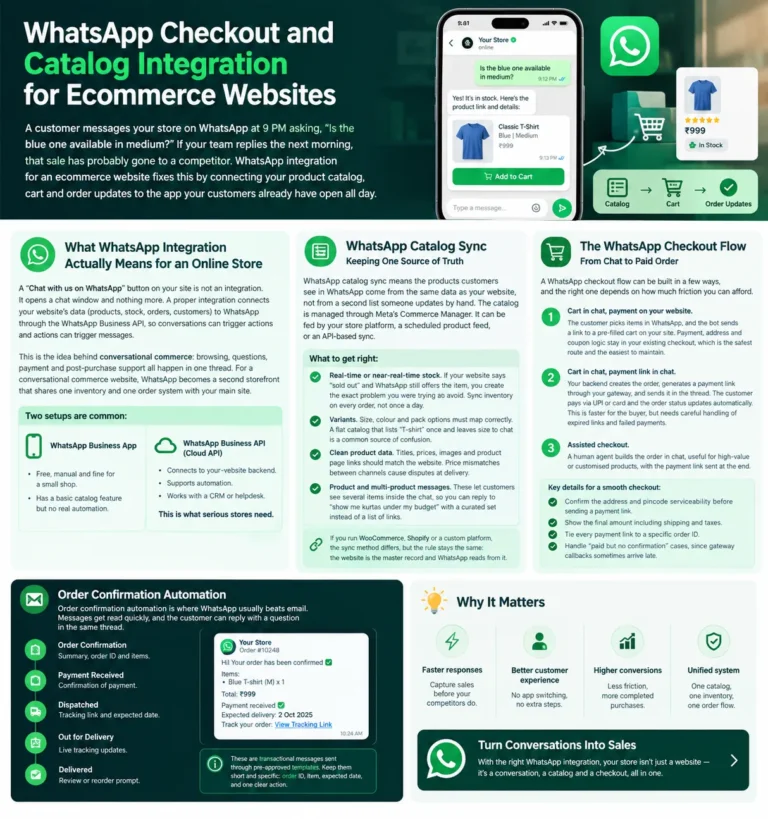
A “Chat with us on WhatsApp” button on your site is not an integration. It opens a chat window and nothing more. A proper integration connects your website’s data (products, stock, orders, customers) to WhatsApp through the WhatsApp Business API, so conversations can trigger actions and actions can trigger messages.
This is the idea behind conversational commerce: browsing, questions, payment and post-purchase support all happen in one thread. For a conversational commerce website, WhatsApp becomes a second storefront that shares one inventory and one order system with your main site.
Two setups are common:
WhatsApp catalog sync means the products customers see in WhatsApp come from the same data as your website, not from a second list someone updates by hand. The catalog is managed through Meta’s Commerce Manager. It can be fed by your store platform, a scheduled product feed, or an API-based sync.
What to get right:
If you run WooCommerce, Shopify or a custom platform, the sync method differs, but the rule stays the same: the website is the master record and WhatsApp reads from it.
A WhatsApp checkout flow can be built in a few ways, and the right one depends on how much friction you can afford.
Whichever route you choose, some details decide whether it converts:
Since the chat flow feeds into your normal order pipeline, it should follow the same principles as your website’s checkout. Our guide on the checkout flow covers what makes that page convert, and the same rules apply here.
Order confirmation automation is where WhatsApp usually beats email. Messages get read quickly, and the customer can reply with a question in the same thread.
A useful post-purchase sequence covers order confirmation with summary, payment received, dispatched with tracking link, out for delivery, and delivered with a review or reorder prompt. These are transactional messages sent through pre-approved templates. Keep them short and specific: order ID, item, expected date, and one clear action.
One rule to build around: WhatsApp allows free-form replies only within a limited window after the customer last messaged you. Outside that window you can only send approved template messages. Plan your flows so critical updates always use templates.
Cart recovery via WhatsApp works because it reaches people who left mid-purchase, but it must be done with consent. Customers should opt in to WhatsApp messages, for example through a checkbox at checkout, and your messages must use approved templates.
A sensible approach:
Avoid discounts in every recovery message. If you always offer a coupon, customers learn to abandon carts on purpose.
A typical integration starts by mapping your product data and order lifecycle, then sets up the Business API account and catalog. Next comes the checkout path and payment-link logic, then message templates and automation rules. Testing covers failed payments, out-of-stock items, duplicate messages and handoff to a human. A soft launch with a small customer segment comes before a full rollout.
This work sits inside your wider ecommerce build, so it makes sense to plan it alongside your store’s architecture. You can see how we approach that on our website development services page.
It connects your online store’s products, orders and customer data to WhatsApp through the Business API, so catalog browsing, checkout links and order updates work inside a chat instead of just linking to a chat button.
The Business App is enough for a small store handling a few chats manually. If you want automated order updates, cart recovery, multiple agents or website-linked data, you need the Business API.
Your products are uploaded to a catalog in Meta’s Commerce Manager, either through a feed or a platform integration. The sync keeps prices, stock and product details aligned with your website.
It depends on region and setup. The most reliable approach for most Indian stores is sending a payment link from your gateway inside the chat, so payment stays secure and reconciles with your order system.
Not always. It suits customers who prefer chatting, repeat buyers and high-touch products. Your website checkout should remain the main path, with WhatsApp as an added, faster route.
Yes. Collect explicit opt-in, for example at checkout or signup, and keep a record of it. Sending unrequested messages can hurt your number’s quality rating.
Templates are pre-approved message formats for notifications sent outside the reply window, such as order confirmations or cart reminders. You submit them for approval, so they must be planned in advance.
When a customer who opted in abandons a cart, your system sends an approved template with a link back to the saved cart. Keep it to one message and one follow-up at most.
Yes, all can be connected, though the method differs. Some use plugins or apps, while custom stores usually connect through APIs. The right choice depends on how much control and automation you need.
It varies with the platform, the number of automated f ows and Meta’s per-conversation or per-message charges, which change over time. A scoped quote after reviewing your store is more reliable than a generic number.
If you’d like to know which checkout route suits your products and how the catalog would connect to your current site, let’s talk it through. Visit Sanjeev Kumar Malik’s website development services or call 9718604362.