Dark Mode Website Design: Is It Actually Worth Building for Your Audience?
Dark Mode Website Design: Is It Actually Worth Building for Your Audience? Dark mode is worth building when your visitors...
Read More → Headless WordPress means using WordPress only as the place where you write and manage content, while a separate frontend (usually React or Next.js) fetches that content through an API and builds the pages visitors see. It makes sense when you need a custom frontend, several channels fed from one content source, or performance that a traditional theme can’t deliver. For most business websites, a well-built traditional WordPress site is faster to launch, cheaper to run, and easier to maintain.
That’s the short version. The rest of this post covers what you gain, what you quietly lose, and how to decide.
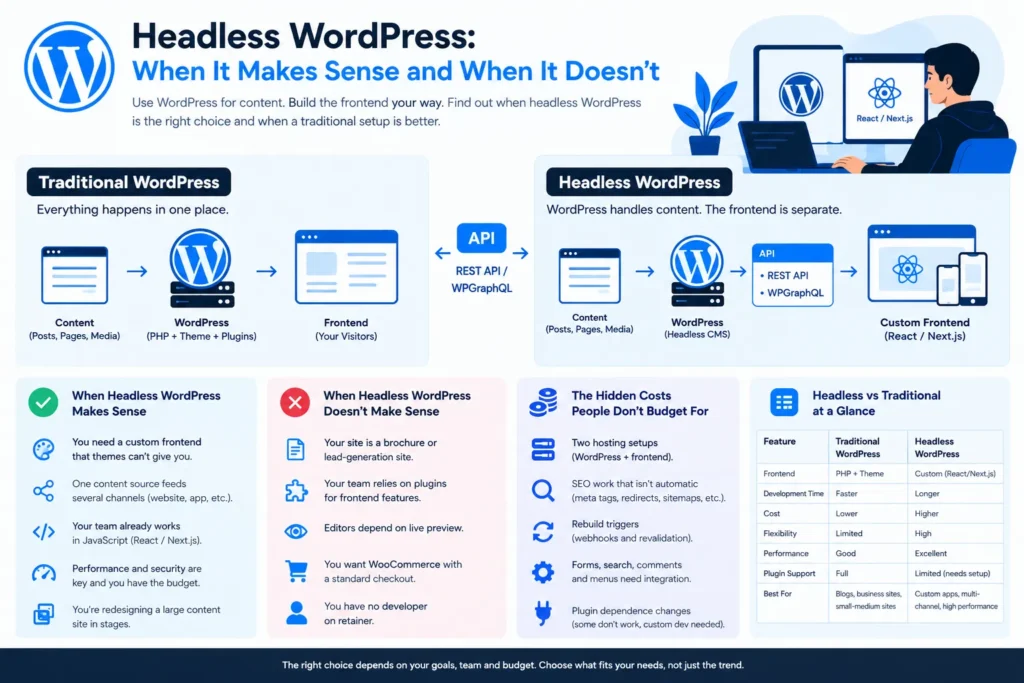
In a normal WordPress site, one system does everything: it stores content, runs PHP to assemble the page, and sends finished HTML to the browser. Your theme and plugins control how the page looks.
In a headless setup, WordPress is split from its “head” (the frontend). Editors still log in to the familiar dashboard, but WordPress just serves data. Your frontend requests that data, and there are two common ways to do this:
The frontend, often a Next.js app, takes that data and renders it. This is the “WordPress as headless CMS” model, and it’s what people mean by a decoupled WordPress frontend. Some teams go further and use it as a WordPress API-first setup, where the same content also feeds a mobile app, a kiosk or another site.
Your site is a brochure or lead-generation site. Ten to thirty pages, a contact form, a blog. A clean custom theme handles this well and costs less to build and maintain.
Your team relies on plugins for frontend features. This is the most common surprise. Page builders, form plugins, SEO plugins, sliders, popups, membership tools, and many WooCommerce extensions print their output through the theme layer. In a headless build, none of that appears on your frontend automatically. Each feature has to be rebuilt or re-connected through the API, which is where budgets grow.
Editors depend on live preview. In a traditional site, “Preview” just works. In headless, preview needs to be built deliberately (Next.js has a draft mode for this), and if it’s skipped, editors end up publishing blind.
You want WooCommerce with a standard checkout. Product listings can be fetched through an API, but cart, checkout, payments, coupons and account pages are hard to decouple cleanly. It’s doable, though it’s a serious project rather than a tweak.
You have no developer on retainer. Headless means two codebases, two deployments and often two hosting environments. When something breaks, it’s not always obvious which side broke. If nobody technical will own that, the flexibility becomes a liability.
Traditional WordPress | Headless WordPress | |
Frontend | PHP theme | React / Next.js or similar |
Plugins with frontend output | Work out of the box | Need rebuilding or API work |
Editor preview | Built in | Must be custom-built |
Hosting | One environment | Two environments |
Best for | Business sites, blogs, most WooCommerce stores | Multi-channel content, custom app-like frontends |
Maintenance | Simpler | Two codebases to maintain |
If you answer “yes” to the first two and have a clear answer to the fourth, headless is worth serious consideration. If your honest answer to the fifth is “probably,” start there instead. It’s a smaller step and it’s reversible.
If you’re comparing architectures more broadly, our website development services page explains how different approaches fit different business needs.
It’s WordPress used only for managing content, with a separate frontend displaying that content by pulling it through an API.
It can be, especially when pages are pre-rendered and served from a CDN. But speed depends on how well the frontend is built. A well-optimized traditional site can beat a poorly built headless one.
Your editors don’t. They keep using the normal WordPress dashboard. Your developers do need JavaScript skills (React or a framework like Next.js) to build and maintain the frontend.
The REST API is built into WordPress and needs no extra plugin. WPGraphQL is a plugin that lets you request exactly the fields you need in a single call, which many teams find cleaner for complex frontends. Both work; the choice usually comes down to your developers’ preference and the project’s complexity.
Backend plugins mostly do. Plugins that output something on the frontend (forms, sliders, page builders, popups) generally won’t display on a headless frontend without extra work.
It can be, but SEO isn’t automatic. Meta tags, sitemaps, canonicals, redirects and schema must all be implemented in the frontend. Done properly, it works well. Done carelessly, rankings can drop after launch.
Yes, but it’s one of the harder cases. Product data is easy to fetch, while cart, checkout and payments need careful handling. For a standard store, a traditional WooCommerce setup is usually more practical.
Generally yes, both to build and to maintain, because you’re running two systems and rebuilding features that plugins used to handle. I don’t quote generic numbers here because the scope drives the price far more than the architecture label does.
Your content stays in WordPress, so the data isn’t lost. Going back means building or adopting a theme again, which is real work, but the content itself is safe.
If your site is mainly pages and a blog, you probably don’t. If you’re serving content to multiple platforms or need a highly custom frontend experience, it’s worth a proper discussion before you commit.
Send me a short description of your site, the plugins you rely on today, and what you’re hoping to fix or build. I’ll tell you honestly whether headless WordPress fits or whether a traditional build would serve you better.
Sanjeev Kumar Malik
📞 9718604362
🔗 Explore website development services