Dark Mode Website Design: Is It Actually Worth Building for Your Audience?
Dark Mode Website Design: Is It Actually Worth Building for Your Audience? Dark mode is worth building when your visitors...
Read More → Use an off-the-shelf plugin when your need is common and well served by a maintained product (contact forms, basic SEO, caching). Choose custom WordPress plugin development when the functionality is core to how your business runs, when stacking plugins is slowing the site down, or when you need to own the code. Most business sites end up using both, and the skill is knowing which job belongs to which.
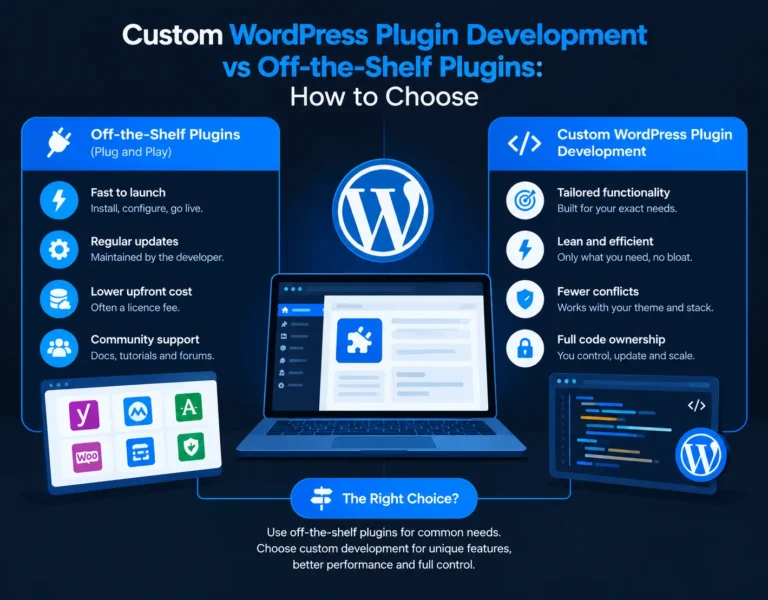
A business site starts with a theme and five plugins. Two years later it has thirty-five. One adds a booking form, another tweaks checkout, a third exists only because the second one broke something. Nobody remembers why half of them are installed, and updating any of them feels risky.
That’s the real cost of leaning entirely on off-the-shelf plugins, and it’s what pushes owners to look at custom WordPress plugin development in the first place. But custom isn’t automatically better. Let’s look at where each approach wins.
Don’t build what already exists and works. A well-maintained premium or free plugin gives you:
For things like a standard contact form, an XML sitemap, or image compression, a custom build is rarely justified.
Most premium plugins are built to serve every kind of customer, so they ship with dozens of features you’ll never use. WordPress plugin bloat shows up as extra scripts and stylesheets loaded on pages that don’t need them, bigger database footprints, and admin screens full of settings you didn’t ask for. A plugin built for a hundred use cases carries the weight of all hundred, even when you need one.
Each plugin adds PHP execution, database queries, and often front-end assets. One plugin rarely ruins a site. Twenty-five, each loading its own CSS and JavaScript sitewide, will. If you’ve already fought slow load times, our guide on how to speed up a slow WordPress website covers how much of the problem usually traces back to plugins.
Two plugins that hook into the same part of WordPress (checkout, user roles, the editor) can clash after an update, and the clash often shows up as a white screen or a broken form at the worst moment. The more plugins overlap in what they touch, the more likely a conflict becomes.
Off-the-shelf plugins do what the vendor decided they should do. If your workflow is slightly different (a quote calculator with your pricing logic, a dealer portal with approval steps, an integration with your own inventory system), you end up bending your process around the plugin, or stacking three plugins and custom snippets to fake it.
A custom plugin is code written for your exact requirement and nothing else. That has practical consequences:
With an off-the-shelf plugin, you hold a licence. If the vendor stops updating it, raises prices, or gets acquired, your options narrow quickly. With custom development, ownership depends entirely on what’s agreed upfront, so get it in writing:
If a developer can’t answer these clearly, that’s a bigger red flag than any technical limitation.
This is the honest trade-off. A custom plugin has no vendor maintaining it for you. WordPress core, PHP versions, and your other plugins will all change, so someone has to keep the code compatible. Before committing, ask:
A well-documented custom plugin with a maintenance arrangement is easy to live with. An undocumented one nobody understands is a liability.
Factor | Off-the-shelf plugin | Custom plugin |
Upfront cost | Lower | Higher |
Time to launch | Fast | Depends on scope |
Fit to your workflow | Approximate | Exact |
Performance | Can carry unused features | Only what you need |
Conflict risk | Higher with many plugins | Lower, if built well |
Code ownership | Licence only | Yours, if agreed in contract |
Ongoing maintenance | Vendor handles it | You or your developer handle it |
Ask these in order:
A hybrid is often the best answer: standard plugins for commodity features, custom code for the parts that make your business different.
If you’re considering decoupling your front end from WordPress, plugin choices matter even more, because many plugins assume a traditional theme-rendered site. We cover that in Headless WordPress: When It Makes Sense and When It Doesn’t, and the plugin question is one of the first things to settle there.
For the wider picture of how plugins, themes and custom code fit into a build, see our WordPress development and website development services.
It’s the process of writing a plugin from scratch to add a specific feature to your WordPress site, rather than installing a general-purpose plugin built for many users.
Not always. A premium plugin is better when it covers your need well and is actively maintained. A custom plugin is better when your requirement is specific, central to your business, or when several plugins are being forced to do one job.
The number matters less than what each plugin does. A few heavy plugins loading scripts on every page can hurt more than many lightweight ones. Plugin bloat usually comes from features and assets loaded where they aren’t needed.
Yes, if those plugins together serve one workflow. A single purpose-built plugin can often replace a group of overlapping ones, which also reduces conflict risk.
That depends on your agreement with the developer. Confirm in writing who owns the source code, whether you receive the full files, and whether it’s stored in a repository you can access.
Not automatically. Security depends on how the code is written and maintained. A custom plugin built with proper sanitisation, escaping, nonces and capability checks can be very secure, while a poorly written one can be worse than a popular plugin.
It can, if it isn’t maintained. WordPress core and PHP versions evolve, so a custom plugin needs periodic compatibility checks, ideally on a staging site before updates go live.
It depends on scope. A single-purpose feature is much quicker than a plugin with admin screens, custom database tables and third-party integrations. A clear brief and defined requirements shorten the timeline.
That’s why documentation, version control and code ownership matter. If another WordPress developer can read, understand and update the code, you’re not locked in.
Yes, and most well-run sites do. Use trusted plugins for standard features and custom development for the functionality that’s unique to your business.
If you’re weighing a custom plugin against a premium one, I can look at what you’re running now and tell you honestly which features are worth building and which should stay as they are. No pressure to build anything.
Brand: Sanjeev Kumar Malik
Call: 9718604362
Explore: Website Development Services