Dark Mode Website Design: Is It Actually Worth Building for Your Audience?
Dark Mode Website Design: Is It Actually Worth Building for Your Audience? Dark mode is worth building when your visitors...
Read More → If your website looks polished but visitors still bounce within seconds, or it’s easy to use but feels dated and forgettable, you’re probably dealing with a UI problem, a UX problem, or both. UI (User Interface) is what a user sees and interacts with — buttons, colors, typography, layout. UX (User Experience) is how the entire journey feels — whether the product actually solves the user’s problem quickly and without friction. They’re related, but they’re not the same job, and confusing the two is one of the most common (and expensive) mistakes businesses make when building a website or app.
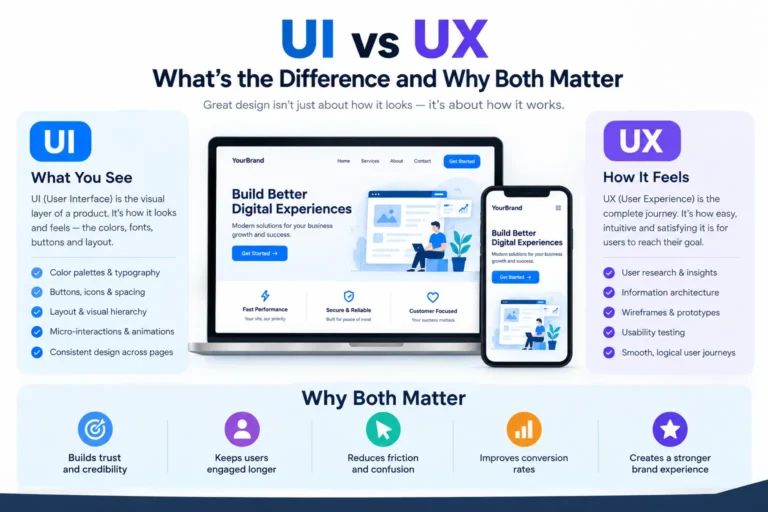
UI design is the visual and interactive layer of a product. It covers:
A UI designer is answering one core question: does this look clear, on-brand, and pleasant to interact with? Good UI makes a page feel trustworthy and easy to scan. Bad UI shows up as cluttered layouts, inconsistent buttons, text that’s hard to read, or a design that feels like five different people worked on five different pages without talking to each other.
UX designis broader and less visible. It’s the structure behind the screen — how someone moves from “I have a problem” to “I got what I came for.” UX work includes:
A UX designer is answering a different question: can the user actually complete their goal, and does the path there make sense? A checkout form can look beautiful (good UI) and still make people abandon their cart because it asks for account creation before they can pay (bad UX). That’s the gap most businesses don’t see until conversions start dropping.
Think of a restaurant. UX is the layout of the space, how the menu is organized, how easy it is to find a table, how long you wait, and whether the whole visit makes sense from entry to exit. UI is the plating, the lighting, the way the menu itself is designed on the page. You can have gorgeous plating in a restaurant where you can’t find the entrance — that’s strong UI with weak UX. You can also have a perfectly smooth dining flow served on paper plates — solid UX undercut by weak UI. A website works the same way: one without the other always leaves something broken.
In real projects, UI and UX aren’t separate departments working in isolation — they inform each other constantly. Wireframes (a UX deliverable) define where elements sit before UI decides what those elements look like. Usability testing often reveals that a UI choice — a button color, a font size, a hidden menu — is quietly breaking the user journey. This is why UI/UX design services are usually offered together rather than as two disconnected line items: a wireframe with no visual polish won’t convert, and a beautifully styled page with a confusing flow won’t retain users either.
If both lists sound familiar, that’s not unusual — the two problems tend to travel together, because a confusing flow often gets papered over with inconsistent visual patches instead of being restructured properly.
Investing only in UI gets you a good-looking site that people still struggle to use — traffic comes in, but conversions stay flat. Investing only in UX gets you a functional flow that fails to build trust or hold attention, because visitors judge credibility visually within seconds of landing on a page. Website conversion design depends on getting both layers right at the same time: the structure has to make sense, and the surface has to look like it belongs to a business worth trusting. This is exactly why UI/UX design services combine research, wireframing, visual design, and prototyping into one process instead of treating them as separate deliverables.
A typical UI/UX design engagement moves through research and user journey mapping first, then wireframes to lock the structure, then visual UI design applied on top of that structure, and finally prototypes to test the flow before a single line of production code gets written. Skipping the wireframe stage and jumping straight to visuals is the most common shortcut that causes rework later — because fixing a structural problem after the visual design is done usually means redoing both.
In smaller teams, one person often handles both. In larger projects, UX (research, structure, flow) and UI (visual design) are usually split, but they work in close coordination throughout the project rather than in isolation.
Neither works well alone. A site can look great and still lose users to a confusing flow, or have a perfect flow that fails to build trust because it looks unfinished. They need to be solved together.
Yes, if the underlying flow and structure are already working well and only the visual layer needs updating — a common request when a brand refreshes its look without changing how the site functions.
Look at analytics for drop-off points, and watch a few real users navigate the site without guidance. If people get stuck at the same step repeatedly, that’s a UX issue, not a visual one.
A wireframe is a basic structural sketch showing layout and content placement, with no real visual design. A prototype is a more advanced, often clickable version that simulates how the final experience will actually behave.
Yes — usability and visual hierarchy directly influence whether visitors trust a page enough to act, and whether they can complete an action (like checkout or a form) without giving up partway through.
It depends on the scope, but it generally includes research, wireframing, visual design, and testing as distinct phases — rushing through any one of them tends to show up as usability issues later.
Even simple sites benefit from basic UX thinking — clear navigation, a logical page order, and an obvious next step for the visitor. It doesn’t need to be an elaborate process to matter.
Design tools built for structuring layouts and building clickable prototypes are standard in the industry; the specific tool matters less than whether the process includes real user testing before development.
Yes, and this is often the most efficient approach — reworking structure and visuals together avoids the rework that happens when one is fixed without accounting for the other.
If your website’s design and flow haven’t been evaluated together, that’s usually where the biggest, easiest wins are hiding. Sanjeev Kumar Malik’s UI/UX Design Services cover both sides of this — research, wireframes, visual design, and prototyping — so the two layers are built to work with each other from the start, not patched together later. For a walkthrough of what that would look like for your specific site, reach out at 9718604362.