Dark Mode Website Design: Is It Actually Worth Building for Your Audience?
Dark Mode Website Design: Is It Actually Worth Building for Your Audience? Dark mode is worth building when your visitors...
Read More → Indian shoppers usually leave a checkout for four reasons: the form asks for too much, the payment step fails or confuses them, the total changes late, or they don’t trust the page enough to enter card or UPI details. Fix those four and most of your checkout friction goes away.
Most stores don’t lose customers at the product page. The shopper has already decided to buy. They tap “Proceed to checkout” and that is where the sale quietly falls apart. This post walks through what actually causes that on Indian ecommerce websites, and what to change first.
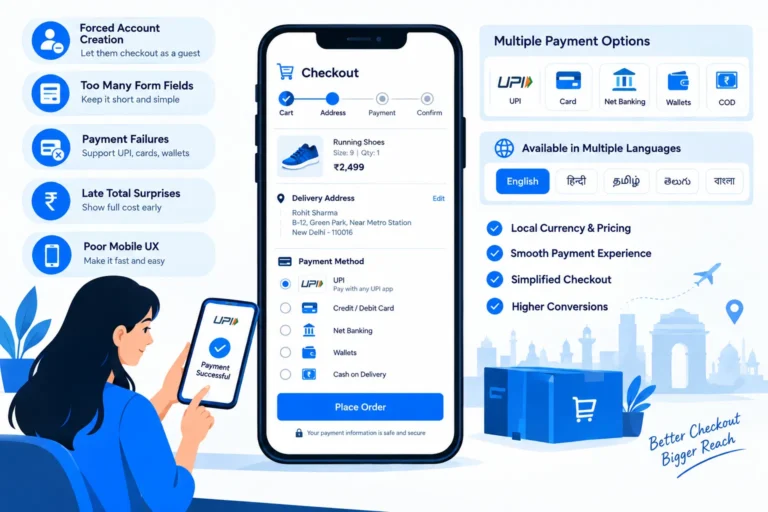
A checkout built on Western assumptions breaks in India. Cards are only one payment method among UPI, net banking, wallets, EMI and cash on delivery. Many shoppers are on mid-range phones with patchy 4G. Addresses are messy, with landmarks, gali names and no consistent format. Many buyers also still worry about getting the product at all.
So a good ecommerce checkout flow in India has to handle payment variety, weak networks, unusual address formats and low trust. Copying a global template rarely does.
Asking a first-time buyer to register before paying is the fastest way to lose them. They came to buy one thing, not to manage a password.
Guest checkout should be the default path. Let people enter a mobile number, verify it with an OTP, and go straight to the address and payment steps. If you want an account, create it silently from the mobile number after the order is placed and offer a password later.
Every extra field is a small decision the shopper has to make, and on a phone each one means more thumb typing. Audit your form and ask of each field: do we need this to deliver the order?
Form field reduction in practice:
Add browser autofill attributes too, so the phone can fill the address in one tap.
Payment failure is one of the most frustrating checkout moments, because the shopper is already committed. Some common causes on Indian stores:
If you track only one number, track your payment failure rate in India by method (UPI, card, net banking, COD). A store that looks fine overall can have one badly broken method hiding inside the average. Your payment gateway dashboard should already break this down. And if a gateway keeps failing for a specific bank, discuss routing or a backup gateway with your developer.
Shipping charges, COD fees or taxes appearing only on the last step feel like a trick. Show the delivery estimate and any extra charges as early as the cart, or at least before the shopper enters payment details. If you offer free shipping above a threshold, show a small progress line so shoppers know how close they are.
Most Indian ecommerce traffic is on phones, so mobile checkout UX is the checkout. Check these on a real mid-range Android phone, not only on your desktop browser:
Cash on delivery is still important for many Indian buyers, but a badly built COD flow creates its own problems: fake orders, high return-to-origin rates and no confirmation from the buyer. Useful fixes are an OTP or WhatsApp confirmation before a COD order is accepted, a small extra prepaid discount to nudge digital payment, and a PIN code serviceability check before checkout so you don’t accept orders you can’t deliver.
Shoppers get most nervous at the payment step, so that is where reassurance matters most. Trust badges at checkout work only when they are real and relevant:
Don’t add badges you haven’t earned or certifications you don’t hold. A fake badge does more damage than none.
Once someone has bought from you, the second purchase should be much faster. One-click checkout for returning customers means a saved address, a tokenised card or UPI preference, and a single confirmation step. It doesn’t have to be literally one click. The aim is to cut the steps a repeat buyer has to repeat.
Some Indian shoppers also prefer to finish the purchase in a chat rather than a form. If that’s relevant to your audience, our [WhatsApp Checkout blog URL] guide covers how conversational checkout can sit alongside your regular flow.
If you can’t change everything at once, this order usually gives the fastest return:
Make one or two changes at a time and compare checkout completion before and after. That way you know which change worked instead of guessing.
Checkout is one part of the overall store architecture, along with your platform choice, hosting, payment integration and mobile performance. If you’re planning a new store or rebuilding a leaky one, see my Website Development Services page for how I approach ecommerce builds end to end.
A good flow lets a shopper check out as a guest with a mobile number, fill a short address form with PIN code autofill, choose from UPI, cards, net banking and COD, and see the full total before paying. Everything should work smoothly on a mobile phone.
Yes, in most cases. Guest checkout removes the biggest early barrier for new customers. You can still create an account after the order using the mobile number they already verified.
Yes, in most cases. Guest checkout removes the biggest early barrier for new customers. You can still create an account after the order using the mobile number they already verified.
As few as delivery needs. Usually that is name, mobile number, PIN code, address and an optional landmark, plus email only if you need it. Remove any field you can’t justify.
Look at failure rates for each payment method, not just the total. Then check gateway settings, OTP delivery, UPI flow (intent vs collect), bank-specific issues and retry behaviour. Consider a backup payment option for methods that fail often.
On mobile, intent usually feels smoother because it opens the shopper’s UPI app directly. Collect requests depend on the shopper noticing a notification, which many miss. Your gateway documentation will show which flows it supports.
They can, if they are genuine and relevant, such as real payment logos, a clear refund policy line and visible support contact. Made-up or irrelevant badges can hurt trust.
For many Indian audiences, yes. To limit fake orders and returns, add OTP or WhatsApp confirmation, check PIN code serviceability, and consider a small incentive for prepaid payment.
It means returning customers can buy with saved details and one confirmation. It is most valuable for stores with repeat purchases, such as consumables, fashion or regular reorders. New stores can start with guest checkout and add this later.
Track checkout completion rate, payment success rate by method, and mobile vs desktop completion. Change one thing at a time so you can tell what worked.
If your traffic is fine but orders aren’t matching, the leak is often in the checkout. I can look at your current flow on mobile and suggest the specific fixes worth making first.
Talk to Sanjeev Kumar Malik: call 9718604362 or visit Website Development Services to discuss your ecommerce checkout.