Dark Mode Website Design: Is It Actually Worth Building for Your Audience?
Dark Mode Website Design: Is It Actually Worth Building for Your Audience? Dark mode is worth building when your visitors...
Read More → Most businesses don’t realize they’re choosing an architecture until the choice starts costing them. A traditional CMS ties your content, design, and delivery together in one system. A headless CMS separates them — your content lives in one place, and it gets delivered to your website, app, or any other screen through an API. That single difference is what this whole comparison comes down to, and it decides how fast your site loads, how easily your team can add new features later, and how much a redesign will cost you two years from now.
If you’re currently comparing headless cms vs traditional website setups for a project brief, here’s the short version: traditional website development (WordPress, Joomla, most out-of-the-box CMS platforms) bundles your backend and frontend together, which is faster to launch and easier to hand off to a non-technical team. Headless architecture decouples them, which costs more upfront but gives you far more flexibility as your business grows. Which one is “better” depends entirely on what you’re building and who’s going to maintain it.
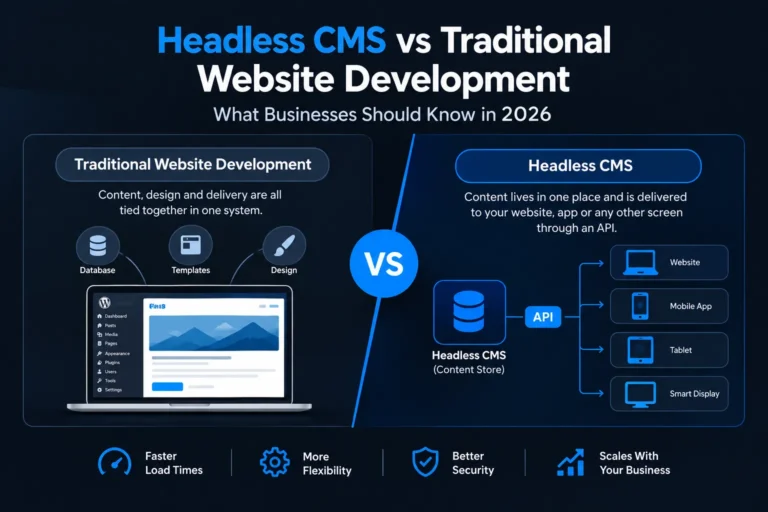
In a traditional setup, the CMS controls everything — the database, the admin panel, and the templates that render your pages. When someone visits your site, the same system that stores your content also decides how it looks.
An API-first website breaks that link. The CMS becomes a pure content store. When a page loads, your frontend framework (React, Next.js, Vue — whatever your dev team picks) requests the content through a content delivery API and renders it however it wants. The CMS doesn’t know or care if that content ends up on a website, a mobile app, a smart display, or a partner’s site — it just serves data.
This is why headless setups show up so often in Jamstack projects: static site generation pre-builds your pages at deploy time using content pulled from the API, then serves them from a CDN. The result is pages that load in a fraction of the time a database-driven traditional site needs, because there’s no live database query happening when a visitor lands on the page.
Most businesses don’t realize they’re choosing an architecture until the choice starts costing them. A traditional CMS ties your content, design, and delivery together in one system. A headless CMS separates them — your content lives in one place, and it gets delivered to your website, app, or any other screen through an API. That single difference is what this whole comparison comes down to, and it decides how fast your site loads, how easily your team can add new features later, and how much a redesign will cost you two years from now.
If you’re currently comparing headless cms vs traditional website setups for a project brief, here’s the short version: traditional website development (WordPress, Joomla, most out-of-the-box CMS platforms) bundles your backend and frontend together, which is faster to launch and easier to hand off to a non-technical team. Headless architecture decouples them, which costs more upfront but gives you far more flexibility as your business grows. Which one is “better” depends entirely on what you’re building and who’s going to maintain it.
Decoupled architecture isn’t automatically the right call. Traditional development still makes more sense in a lot of real situations:
Faster to launch. WordPress and similar platforms come with themes, page builders, and plugins that get a functional site live in days, not weeks. If you need something up before a product launch or an event, that speed matters more than architectural purity.
Lower technical overhead. Your marketing team can log into the CMS, edit a page, and publish it without touching code or waiting on a developer. A headless setup usually needs a developer involved every time the frontend needs to change, even for small layout tweaks.
Cheaper to build and maintain. You’re paying for one system, not two. Headless projects need a CMS subscription plus a separately built and hosted frontend, which means more moving parts and more places something can break.
Plugin ecosystem. Need a booking calendar, a membership system, or an SEO plugin? Traditional platforms have thousands of pre-built options. Headless setups often mean building custom integrations for things a traditional CMS handles out of the box.
The trade-off flips once your requirements get more complex or your traffic grows.
Speed at scale. Because most headless sites use static site generation or aggressive caching, they don’t hit a live database on every page load. That translates directly into faster load times — which matters for both user experience and search rankings.
Frontend framework flexibility. You’re not locked into whatever templating system your CMS ships with. If your dev team wants to build in Next.js today and migrate to something else in three years, the content layer doesn’t have to move with it.
One content source, many outputs. If you’re publishing the same content to a website, a mobile app, and maybe a kiosk or partner integration down the line, a decoupled cms lets you manage it once and push it everywhere through the API, instead of duplicating content across separate systems.
Smaller attack surface. Traditional CMS platforms are frequent targets for automated attacks specifically because the admin panel, database, and public-facing site all sit on the same stack — a vulnerability in one can expose the others. Separating the content layer from the delivery layer reduces that overlap, which is worth factoring in alongside whatever hardening and update discipline you’re already applying to keep a site secure.
A few honest questions cut through most of the back-and-forth:
There’s no universally correct answer here — a large e-commerce brand publishing across five channels has a completely different calculus than a service business that just needs a fast, editable five-page site.
Usually, yes, upfront. You’re paying for a CMS plus a separately developed frontend, versus one bundled system. The cost difference narrows or reverses over time if you need multi-channel publishing or frequent frontend changes, since headless avoids expensive rebuilds later.
Yes, but it’s a significant migration, not a settings toggle. You’re essentially rebuilding the frontend and restructuring how content is stored and delivered, so it’s worth planning for headless upfront if you expect to need it within a couple of years.
For the frontend, yes — content editors can still use a simple admin panel to add and edit content, but any change to how that content displays typically needs a developer. Traditional CMS platforms let non-technical staff handle more of both.
It can be, mainly because of speed. Static site generation and CDN delivery often produce faster load times than a database-driven traditional site, and page speed is a ranking factor. But SEO also depends on proper metadata, structured content, and technical setup — headless doesn’t guarantee better rankings by itself.
Headless describes the CMS architecture — content and delivery are decoupled. Jamstack describes a broader approach to building the frontend, usually using static site generation and APIs, that often (but not always) pairs with a headless CMS.
Yes. WordPress can run “headless,” using its backend purely as a content API while a separate frontend (built in React or Next.js, for example) handles the display. It’s a middle ground for teams who want WordPress’s familiar editing experience with a more modern frontend.
A traditional site built on an established CMS with themes can go live in a few weeks. A headless build typically takes longer because the frontend is custom-developed rather than assembled from pre-built templates.
It can reduce certain risks by separating the admin/database layer from the public-facing site, but security depends on far more than architecture — hosting, access controls, update discipline, and API security all matter regardless of which model you choose.
Businesses publishing content across multiple platforms (website, app, partner sites), companies expecting significant growth or frequent frontend redesigns, and teams that need top-tier page speed for competitive or high-traffic markets tend to benefit most.
For a straightforward small business site with a single frontend, minimal content changes, and no plans for an app or multi-channel publishing, a traditional CMS is usually the more practical and cost-effective choice. Headless makes more sense once complexity or scale enters the picture.
Switching architectures midway through a build is expensive and slow, so this is worth getting right before development starts. Sanjeev Kumar Malik offers a free assessment to look at your specific content volume, team structure, growth plans, and budget, and tell you honestly whether headless is worth the extra cost for your project — or whether a well-built traditional website will serve you just as well.
Check out the full range of website development services at sanjeevkumarmalik.in/website-development-services, or call 9718604362 directly to get your free assessment started.