Dark Mode Website Design: Is It Actually Worth Building for Your Audience?
Dark Mode Website Design: Is It Actually Worth Building for Your Audience? Dark mode is worth building when your visitors...
Read More → If you’re comparing WooCommerce and Shopify, the short answer is this: Shopify gives you a faster, more predictable launch with everything bundled into one monthly bill, while WooCommerce gives you more control and lower long-term costs if you’re willing to manage the moving parts yourself — hosting, plugins, and updates included. Neither one is “better” in the abstract. The right pick depends on how much you want to own versus how much you want handled for you.
Let’s break this down properly across the four things that actually decide this for most business owners: cost, flexibility, plugin ecosystem, and ease of use.
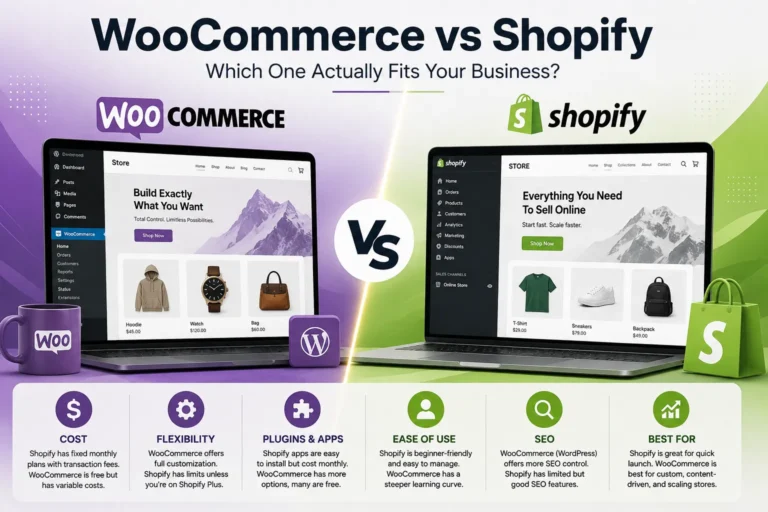
Shopify’s pricing looks simple on paper. As of 2026, the core paid plans are Basic at $39/month, Grow at $105/month, and Advanced at $399/month, with Shopify Plus starting north of $2,300/month for large enterprise operations. Pay annually and you shave roughly 25% off Basic, Grow, and Advanced. That monthly fee covers hosting, SSL, checkout, and uptime — you’re not managing servers or worrying about a plugin conflict taking your store offline at 2 AM.
But the plan fee is only part of the bill. Unless you’re on Shopify Payments, you’re also paying a transaction fee on top of your card processing rate — anywhere from roughly 0.6% to 2% depending on your plan. At real sales volume, that adds up fast, and it’s the number most first-time Shopify users forget to budget for.
WooCommerce flips the model. The plugin itself is free — genuinely, permanently free. But WooCommerce runs on WordPress, and WordPress needs a home. Shared hosting can start as low as $5–10/month, but that’s not what a serious store should run on. Realistic managed WordPress or WooCommerce-specific hosting sits somewhere between $25–100/month depending on your traffic, and premium hosts built for scale (Kinsta, WP Engine, Cloudways) push higher for high-volume stores. Add a domain, a decent theme, and the handful of premium extensions almost every real store ends up needing — subscriptions, advanced shipping rules, better search — and a functioning WooCommerce store typically lands somewhere between $150–500/month once everything is accounted for, more if you’re running a large catalog with complex logistics.
The honest comparison isn’t “Shopify costs money, WooCommerce is free.” It’s “Shopify bundles its costs into one predictable number, WooCommerce spreads its costs across several smaller decisions you have to make yourself.” If you value predictability, that favors Shopify. If you value control over where every rupee goes, that favors WooCommerce.
This is where WooCommerce pulls ahead for a lot of businesses, and it’s not close. Because WooCommerce is built on WordPress, you have full access to the underlying code, the database, and the theme files. If you want a checkout flow that doesn’t look like every other Shopify store on the internet, or a product page with logic Shopify simply doesn’t support out of the box, WooCommerce can be built to do it. There’s no platform ceiling — the ceiling is whatever your developer can build.
Shopify’s flexibility is real but bounded. The Liquid templating language and the app ecosystem let you customize a lot, but you’re still working within Shopify’s architecture. Certain checkout customizations are locked unless you’re on Shopify Plus. If your business model is genuinely unusual — complex bundling, unusual subscription logic, tight integration with an existing internal system — you’ll hit walls on Shopify that WooCommerce simply doesn’t have.
For a standard product-and-checkout store, this difference barely matters day to day. For a business that needs the site to bend around a specific operational model, it matters a lot.
Shopify’s app store is curated, and most apps install with a click and just work — that’s the trade-off for the walled-garden approach. You’re paying monthly subscriptions for a lot of these apps, and they stack up (a store running 8–10 apps isn’t unusual, and each one is its own line item), but the integration quality is generally solid because Shopify controls the platform end to end.
WooCommerce’s plugin ecosystem is the entire WordPress plugin library plus WooCommerce-specific extensions — tens of thousands of options, most of them free or one-time-purchase rather than recurring subscriptions. The catch is quality control isn’t centralized the way it is on Shopify. Two plugins from different developers can conflict with each other in ways that are genuinely hard to diagnose without development experience. This is the single most common reason WooCommerce stores end up needing a developer on retainer — not to build features, but to keep the plugin stack stable as WordPress core and individual plugins push updates.
If you’re a solo founder or a small team without in-house technical support, Shopify is going to feel easier from day one. The dashboard is built for non-developers, updates happen automatically in the background, and there’s no server to think about. You log in, manage products, and ship.
WooCommerce asks more of you. You — or someone you hire — are responsible for WordPress core updates, plugin updates, theme compatibility, backups, and security patching. None of this is difficult individually, but it’s ongoing, and skipping it is how stores end up hacked or broken after a routine update. If you already have WordPress experience, or you’re working with a development team that maintains WordPress sites regularly, this overhead barely registers. If you don’t, it becomes a real, recurring task.
Picking WooCommerce for the “free” plugin and ignoring the hosting and maintenance cost. The plugin being free doesn’t mean the store is free to run — see the cost section above.
Picking Shopify without checking the app subscription math at scale. A store that looks cheap at 50 orders a month can look very different once you’re running 10 apps and paying transaction fees on real volume.
Underestimating how much a mid-catalog migration costs later. Businesses that guess wrong early and try to switch platforms after they’ve built out 500+ products, historical orders, and SEO equity often spend more on the migration than they would have spent picking correctly the first time.
Assuming “easier to use” means “no technical debt.” Shopify reduces day-to-day technical overhead, but a poorly structured Shopify store — bad app stacking, conflicting theme customizations — accumulates its own kind of mess over time.
If you want predictable monthly costs, minimal maintenance, and a platform that just works without a developer on standby, Shopify is the more practical starting point for most small-to-mid businesses. If your business needs deep customization, you’re already comfortable with (or plan to hire for) ongoing WordPress management, and you want full ownership of your platform without recurring app fees, WooCommerce is worth the extra setup effort.
For businesses building on WordPress already, or planning content, SEO, and an online store on the same platform, it’s worth reading through our full breakdown on WordPress Development Services to see how a properly built WooCommerce site compares to a bolt-on solution. And if ecommerce specifically — not just the CMS — is your priority, our E-commerce Website Development page covers what a platform-agnostic build actually looks like, Shopify or WooCommerce.
The plugin itself has no license cost. But a working store still needs hosting, a domain, and usually a few paid extensions, so “free” only applies to the software, not the full setup.
At small scale, Shopify Basic often comes out close to or slightly cheaper than a properly hosted WooCommerce store once you include hosting and premium plugins — the gap widens in WooCommerce’s favor mainly at larger scale or with heavy customization needs.
Yes, but migration gets more expensive and riskier the bigger your catalog and order history get. It’s far cheaper to pick correctly upfront than to migrate a mature store.
If you use Shopify Payments, there’s no separate transaction fee beyond standard card processing. If you use a third-party payment gateway instead, Shopify adds an extra transaction fee on top, which varies by plan.
Yes — since it runs on WordPress, you get full control over URL structure, content, and technical SEO elements, which is one reason content-heavy businesses often prefer it over Shopify’s more restricted blogging and content tools.
Not strictly, but most businesses end up wanting one for ongoing maintenance — updates, plugin conflicts, and security patching are easier to outsource than to learn from scratch while also running the business.
Both can scale, but they scale differently: Shopify scales by upgrading plans and infrastructure Shopify manages for you, while WooCommerce scales by upgrading hosting and architecture you (or your developer) manage directly.
Generally yes. The onboarding, dashboard, and automatic updates are built specifically for non-technical store owners, which is a big part of why it’s the more common first choice.
On Shopify, it’s app subscriptions stacking up over time. On WooCommerce, it’s the hosting upgrade and developer time needed once the store outgrows a basic shared hosting plan.
WooCommerce, being built on WordPress, is generally stronger for content-heavy sites that treat blogging as seriously as the storefront. Shopify’s blog functionality works but is noticeably more limited compared to WordPress’s native content tools.